


SWAC TV
4.516.00 Reviews
App Specs
- Version
- 3.0-googleplay
- Updated On
- License
- Free
- Downloads
- 10,000+
- Developer
- GIDEO.TV
- Categories
- Sports
- Platform
- Android
Screenshots

 Analysis by AppCompare
For HBCU sports fans, the main question is whether a dedicated viewing app fits the way you follow games. SWAC TV gives the conference’s sports coverage its own place on mobile, rather than asking you to hunt through general video feeds. I see the appeal most clearly when a game or team matters enough that you want to check this destination first. The trade-off is that a focused service is only useful when its coverage and viewing experience match what you need that day.
Finding your way around a focused sports app
I find that a focused sports app is easiest to judge by trying a real task, not just browsing its first screen. Before settling in, I’d check whether I can identify the event I want and return to it without losing my place; that quick rehearsal can reveal whether the app fits my habits. From there, the practical question is how comfortably I can use it during a longer session.
A clear purpose, with a narrow scope
SWAC TV is a free sports app from GIDEO.TV, built around SWAC and HBCU sports. That focus is helpful: you are not opening a broad sports hub and sorting through unrelated leagues before getting to the competition you care about. The app’s identity is easy to understand, which makes it a natural starting point for a fan following SWAC teams.
That same focus defines the first thing I would check before relying on it: does the app cover the specific game or team you want to follow? A specialist service can make relevant coverage easier to find, but it is not a substitute for a general sports app if your interests span many leagues. I would treat it as a dedicated companion, not an all-purpose destination for scores, news, and video from every sport.
SWAC TV is listed in the Sports category and has a 4.5 average from around 50 ratings, with more than 10,000 installs. Those figures suggest that it has found an audience among people seeking this particular coverage, but they do not tell me whether a given event is available or how well it will suit an individual viewer. The practical test is simple: open it when you have a specific SWAC viewing goal and see whether it serves that goal more directly than your usual alternatives.
How I would use it in a regular week
Imagine you are at home on a weekend and want to follow a conference matchup, while family members are using the television. A phone gives you a personal way to check the service without taking over the shared screen. Or perhaps you are a student or alum who wants to keep HBCU sports in your routine rather than relying on broad sports feeds where your preferred teams may not be the main focus. In both cases, a dedicated app can reduce the effort of deciding where to look.
I would make the app part of a small viewing workflow rather than assume it handles every piece of following a team. Check the schedule or event information through the sources you already trust, then open SWAC TV when you are ready to watch. For an important game, I would also leave enough time to open the app and orient myself before play begins. That modest step matters with any streaming destination: it avoids discovering a navigation or connection issue at the moment you most want to watch.
Worth Reading Before You Choose

Flipboard Shows What News Apps Must Do Beyond the Feed

Switching to Android Auto Means Rethinking Your Driving Routine

Google Calendar Makes a Crowded Week Easier to Manage

Ludo King Makes the Most of the Minutes Between Plans

Baby Panda World Brings Quick Play to Modern Phones, but Its Game Library Feels Busy

ESPN’s Live Game View Makes Following Close Games Easier
The app’s short name and single-sport focus make it easy to remember, but those qualities do not automatically make every screen effortless. When trying any sports app on a phone, I look for obvious routes back to the event, recognizable labels, and a layout that does not make me repeatedly search. I would judge SWAC TV by whether those basics feel comfortable during a real session, rather than by how polished its first screen appears.
Readable enough for different viewing habits?
Readability is not just about text size; it is also about whether a person can quickly tell what an item represents. Sports apps often ask viewers to scan teams, events, and video choices while attention is divided. For someone who watches only occasionally, clear naming and a predictable route into a game can matter more than a dense screen of extra information. A focused catalog may help by reducing unrelated choices, though it cannot remove the need for understandable labels.
If small text or crowded screens are tiring for you, I would try the app on the device and display you expect to use most. On a phone, a single event title can be easier to inspect when held close, but lengthy browsing may feel cramped compared with a tablet or television screen. If your phone offers system text or display adjustments, it is worth checking whether those changes make the interface more comfortable; I would not assume every control will respond perfectly.
A useful personal test is to hand the device to someone who does not follow SWAC closely and ask them to find the intended event without coaching. If they need repeated explanations, the app may be less approachable for guests or relatives who only tune in for a particular game. That is not a reason to dismiss a specialist service, but it is a good way to tell whether its organization works for the people who will actually use it at home.
Motor and sensory comfort during a session
Watching sports on a phone involves more than tapping play. A viewer may need to hold the device for a long stretch, adjust volume, manage interruptions, and return to the app after switching away. If gripping a phone is difficult, propping it on a stand or resting it on a table can make a long viewing session less demanding. That is a practical adjustment, not a feature I would attribute to the app itself.
For viewers with limited dexterity, the key question is whether the controls are easy to target and whether navigation requires repeated, precise actions. I would test the common path—open the app, locate the intended viewing option, start playback, and change a setting if needed—before depending on it for a live moment. If that path involves too many small targets or uncertain back navigation, a larger screen or a different device may be more comfortable.
Sensory needs vary just as much. Some people want game audio; others may need to keep sound low or off in a shared room. I would check the available playback controls before settling in, especially if you rely on captions or another way to follow spoken commentary. The viewing experience should be judged in the conditions where you plan to use it, not only in a quiet room with headphones. A sports stream can be exciting, but a busy household may make audio choices and interruption recovery just as important as the match itself.
Where access fits into everyday life
The app is rated Everyone, so its listed age classification is broad. That can make it easier for a household to consider as a shared sports destination, though a rating is not a guarantee that every screen or viewing task will suit every age or ability. If a child or older relative will use it independently, I would walk through the route to the intended content together first and see whether the labels and controls make sense to them.
SWAC TV can be useful when you are away from the main television, but a phone is not always the best screen. A commuter might prefer a short check-in, while someone watching a full game may want a larger display and a stable connection. I would avoid assuming that mobile availability means the experience will be equally comfortable in every setting. If you are traveling, sharing a room, or watching with sound restrictions, think through those constraints before the event rather than trying to solve them mid-game.
It also makes sense to keep a fallback in mind for a high-stakes game. A league or team’s other official channels, a television option, or a general sports service may be more convenient if you need broader coverage or a different way to watch. I would not install SWAC TV expecting it to replace every source I use. Its value is strongest when the specific HBCU sports content you want is the priority and the app offers a straightforward route to it.
What may still get in the way
A specialist app narrows the subject, but it can also narrow your options. If you want comprehensive coverage across sports, a general platform is likely to fit better. If you are mainly looking for quick scores, schedules, and text updates rather than video, a dedicated viewing app may not be the first tool I reach for. The right choice depends on whether watching SWAC sports is the central task or only one part of a wider sports routine.
There is also a difference between a service being free and a viewing session being friction-free. SWAC TV costs nothing to download, but you still need a suitable device, enough battery for the time you plan to watch, and a connection that can support streaming. On a long outing, I would charge beforehand and avoid relying on a weak public connection for a game I care about. Those are ordinary mobile-video constraints, but they can have a bigger impact when the event is live and cannot be replayed at your convenience.
The app’s rating is encouraging, yet a 4.5 average from around 50 ratings is a relatively small pool compared with mass-market sports platforms. I would read it as a positive sign from people who have chosen to try the service, not as proof that every viewer will find it accessible or dependable. If you have specific needs—such as large text, caption support, simplified controls, or uninterrupted playback—test those needs directly before making it your only viewing option.
SWAC TV is currently version 3.0-googleplay and requires Android 7.0 or later. That makes checking device compatibility worthwhile before planning around it, especially if you keep an older phone in service. The app is free and rated for Everyone, so the decision is less about an upfront purchase and more about whether your device, viewing habits, and preferred way of following sports line up with a focused service.
My inclusive verdict
I would recommend SWAC TV to someone who specifically wants a mobile destination for SWAC and HBCU sports and is comfortable testing a focused streaming app on their own device. Its strongest quality is its clear subject: fans do not have to begin in a general sports environment to look for this coverage. For alumni, students, families, and supporters who already know which teams they want to follow, that focus can be genuinely convenient.
I would be more cautious if you need a broad sports library, prefer text updates over video, or depend on particular accessibility tools without first checking how they work with the app. Try a short session before an important matchup, inspect the controls and display on your usual device, and decide whether the experience remains comfortable after the novelty of opening it wears off. That is a more useful test than relying on a rating alone.
My overall view is that this is a promising, specific option rather than a universal sports solution. It is free, aimed at a broad age group, and built for viewers whose interest centers on SWAC coverage. If that describes you, it is worth giving it a try; if your needs are broader or your viewing setup has particular access requirements, keep another source available until you know the app works well for you.
Choose the viewing setup that suits the moment
For a quick check while someone else has control of the living-room screen, a phone is the obvious first device to try. For a full matchup, I would consider where the phone will sit, whether you can keep it charged, and whether the connection is dependable enough for the length of the session. Those small decisions are especially useful if you are watching with a family member who may need a larger display or a quieter environment.
Compared with a general sports platform, SWAC TV has the advantage of a narrower destination for fans whose priority is this conference’s coverage. Broad services are usually a better fit when you want to move between leagues, follow scores across many sports, or keep one app for a varied viewing routine. I would use the specialist app for focused viewing and keep a broader source for everything outside that lane.
Who is likely to get the most from it?
I think it is most promising for students, alumni, and supporters who already know they want HBCU sports in their viewing plans and are happy to try a dedicated mobile service. It is also worth considering for a household where one person wants to follow a game without monopolizing the television. If your main goal is live video, the focused approach may save you from browsing through unrelated sports content.
If you mostly want quick results, written updates, or broad coverage across teams and leagues, I would start with a general sports app or another source suited to those habits. Likewise, if you need a particular accessibility aid to follow commentary or navigate comfortably, test that exact need before relying on the app for a game you cannot easily catch elsewhere. That is a sensible way to decide whether its focused appeal outweighs any friction in your own setup.
For a low-pressure first try, open it before a game day and see whether you can orient yourself on your device, then return when you have a specific event in mind. A brief check gives you a chance to judge readability, controls, and comfort without the added pressure of a live moment. If the route feels clear and the viewing conditions work for you, SWAC TV can become a useful part of how you follow SWAC sports; if not, a broader or more accessible alternative may serve you better.
Pros
- Offers convenient access to SWAC sports coverage in one place.
- Lets fans follow teams across the Southwestern Athletic Conference.
- Useful for keeping up with games when away from a television.
- A dedicated sports platform makes conference content easy to find.
- Can help fans discover matchups beyond their favorite team.
Cons
- Game availability may vary by sport
- team
- and broadcast rights.
- Live streams depend on a stable internet connection.
- Video quality may be affected by network speed or device performance.
- The app’s usefulness is limited outside the SWAC sports season.
- Some content or features may require a subscription or account.
FAQs for SWAC TV
What is SWAC TV?
SWAC TV is a streaming service focused on coverage of the Southwestern Athletic Conference (SWAC), including sports and related programming. Depending on the current schedule and available rights, viewers may be able to watch live events, replays, highlights, and other conference content. The selection can change over time, so check the app’s listing and schedule to confirm which teams, events, and features are currently available in your region.
Is SWAC TV free to use?
Access may depend on the event, subscription options, and the way SWAC TV is offered in your region. Some content may be available without an additional payment, while other programming could require a subscription or a valid account. Before downloading or subscribing, review the app’s current store listing and any in-app pricing details. Also check whether your school, conference, or service provider includes access as part of an existing package.
What devices can I watch SWAC TV on?
SWAC TV is intended for supported mobile devices, but compatibility can vary by operating system version, device model, and the app’s current release. Check the Google Play Store or Apple App Store listing for the latest requirements before installing. If you plan to watch on a television, confirm whether the app supports casting or screen mirroring on your device; those options may depend on your phone, TV, and available software.
Does SWAC TV offer live games and replays?
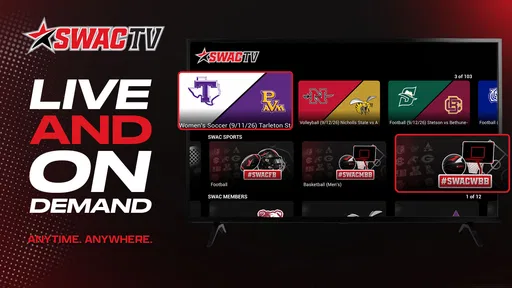
The service may provide live broadcasts and on-demand content for selected SWAC events, but coverage is not necessarily available for every game or sport. Broadcast schedules, replay availability, and video quality can vary according to event rights and production arrangements. It is a good idea to check the schedule in the app before game time and look for replay or highlights options afterward, especially if you cannot watch a live stream.
What should I do if SWAC TV is not streaming properly?
If a video will not start or keeps buffering, first check your internet connection and try switching between Wi-Fi and mobile data. Close and reopen the app, make sure it is updated, and restart your device if the problem continues. Also confirm that the event is currently available and that your account has the required access. Persistent playback or sign-in issues may need to be reported through the app’s support or store listing.


